
Server scripts
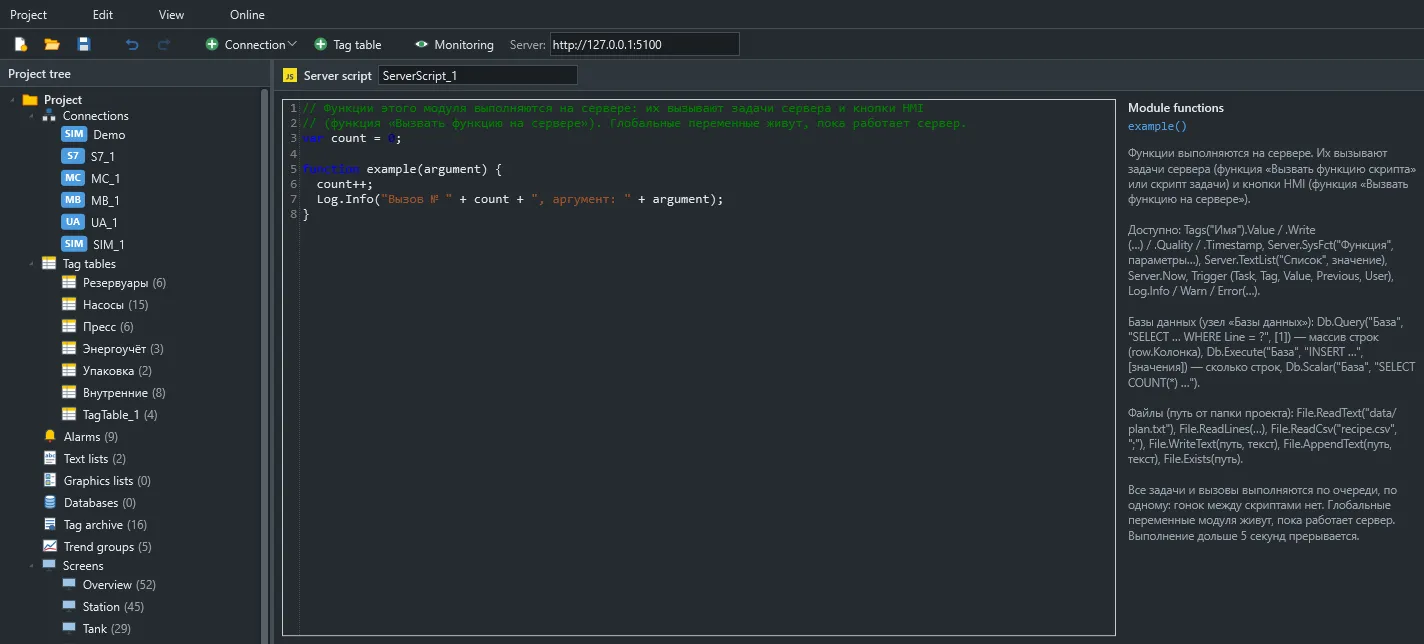
Server scripts run on the server with no operator: counters, schedules, interlocks, sequences, reports and database exchange. They are started by tasks, by HMI.RunServerScript from a screen and by a Table element with a function source.
How execution works
Section titled “How execution works”serverscripts/*.jsmodules load in order when the project starts. Their globals live as long as the runtime runs. After a restart or when a new project version is applied, they start over.- All tasks and calls run one at a time on a single thread, like a PLC scan. Two scripts never run at once, so globals need no protection.
- Tag writes and system functions called from a script run in order after it. If the script fails, they are cancelled.
- The queue holds 10,000 runs. A periodic task that is still waiting is not queued a second time, so runs do not pile up.
| Limit | Value |
|---|---|
| Time per run | 5 seconds, including database queries |
| Statements | 2,000,000 |
| Recursion depth | 256 |
| Memory | 64 MB |
Standard JavaScript is available. setTimeout, fetch and require are undefined. Use an Interval task for repetition and a Condition task for waiting.
What starts a script
Section titled “What starts a script”| Started by | When | Trigger.Tag |
Trigger.Value |
Trigger.Previous |
Trigger.User |
|---|---|---|---|---|---|
| Startup task | Once when the project starts | null |
null |
null |
Сервер |
| Interval task | Every N seconds, 0.1 s at least | null |
null |
null |
Сервер |
| Daily task | At a set server time on chosen days | null |
null |
null |
Сервер |
| Tag change task | On every new value with Good quality |
The tag | New value | Previous value, null the first time |
Сервер |
| Condition task | When the condition becomes true | The tag | The tag’s value | null |
Сервер |
HMI.RunServerScript from a screen |
On an operator action | null |
null |
null |
The operator’s name |
| A screen table | When the table opens and at its refresh period | null |
null |
null |
Сервер |
Trigger.Task holds the task name. While a module loads, Trigger is null. Сервер is the server’s user name.
Schedule details:
- An Interval task first fires one period after startup. If the server was busy or asleep, missed runs are not made up.
- A Daily task uses the server’s local time, written as
08:00or08:00:30. - A Condition task fires on the transition from false to true. If the condition is already true at startup, the task fires too. It can compare with a number,
true/falseor another tag; in the last case the condition is also re-evaluated when that tag changes. - Tag change and Condition tasks only consider values with
Goodquality.
const level = Tags("Tank1.Level");| Member | Description |
|---|---|
.Name |
Tag name |
.Value |
The value with Good or Uncertain quality, otherwise null |
.Read() |
Same as .Value |
.Quality |
Good, Uncertain, Bad, CommFailure, ConfigError, NoData |
.Timestamp |
Last change time, ISO 8601, UTC: 2026-11-16T09:30:00.0000000+00:00 |
.Write(value) |
Write after the script |
Unlike on the client, .Value on the server is null after communication is lost. Booleans come as true/false, numbers as numbers and strings as strings.
Write accepts a number, a boolean or a string. A string written to a non-string tag is parsed like operator input. null cannot be written.
The Server object
Section titled “The Server object”| Member | Description |
|---|---|
Server.Now |
Local server time as a string: 2026-11-16T12:30:00 |
Server.TextList(list, value) |
Text from a text list |
Server.SysFct(name, ...args) |
A system function by name, after the script |
These functions work on the server:
| Function | Parameters in order |
|---|---|
SetBit, ResetBit, InvertBit |
Tag |
SetBitInTag, ResetBitInTag, InvertBitInTag |
Tag, Bit |
SetValue |
Tag, Value |
IncreaseValue, DecreaseValue |
Tag, Step = 1, Limit? |
CopyValue |
Target, Source |
LinearScaling, InvertLinearScaling |
Target, Source, X1, X2, Y1, Y2 |
ShiftAndMask |
Target, Source, Shift = 0, Mask = 65535 |
AcknowledgeAllAlarms |
— |
AcknowledgeAlarm |
Alarm |
RunScript |
Function, Argument? |
Window and screen functions do not work on the server; calling one fails with “works only on the operator screen”.
Server.SysFct("IncreaseValue", "Counter", 1, 1000);Server.SysFct("LinearScaling", "Tank1.Percent", "Tank1.Level", 0, 10, 0, 100);Server.SysFct("AcknowledgeAlarm", "Tank1.HighLevel");The server writes and acknowledges under the user name Сервер, which is what the audit log shows.
| Method | Level |
|---|---|
Log.Info(text), console.log(text) |
Information |
Log.Warn(text), console.warn(text) |
Warning |
Log.Error(text), console.error(text) |
Error |
Entries appear in the runtime window and in the files under %ProgramData%\Scadora\logs, one file per day. Script errors are logged automatically with the task name.
Functions for screens
Section titled “Functions for screens”A module function can be called from a screen:
function startSequence(recipe) { if (Tags("Line.Fault").Value) throw new Error("the line is in fault"); Log.Info(Trigger.User + " started recipe " + recipe); Tags("Seq.Recipe").Write(Number(recipe)); Tags("Seq.Start").Write(true);}// a button script on a screenHMI.RunServerScript("startSequence", "3");The argument is always a string. If the function throws, the operator sees its message and the function’s writes are not performed.
An on-screen table from a function
Section titled “An on-screen table from a function”A Table element with a function source calls the function with no arguments and shows the result.
// An array of arrays: rows of data, with headers set in the table's properties.function pumpsTable() {  return ["Pump1", "Pump2", "Pump3"].map(p => [p, Tags(p + ".Run").Value ? "Running" : "Stopped", Tags(p + ".Hours").Value]);}
// An array of objects: columns come from the first row's properties.function ordersTable() {  return Db.Query("Journal", "SELECT Name AS OrderName, Qty AS Quantity FROM Orders ORDER BY Id DESC");}
At most 1000 rows are sent to a table.
Databases
Section titled “Databases”Databases are described in the editor’s Databases node: SQLite (a file, no driver needed) or ODBC (SQL Server, PostgreSQL, MySQL, Oracle, Access).
| Method | Result |
|---|---|
Db.Query(base, sql, params) |
Array of objects: row.Name, row["Column name"] |
Db.Execute(base, sql, params) |
Number of changed rows |
Db.Scalar(base, sql, params) |
First value of the first row, or null |
Parameters replace ? in order. Pass them as an array or as arguments:
Db.Execute("Journal", "INSERT INTO Events(Time, Text) VALUES(?, ?)", [Server.Now, "Start"]);Db.Execute("Journal", "INSERT INTO Events(Time, Text) VALUES(?, ?)", Server.Now, "Start");Always pass values as parameters rather than joining strings: this avoids quoting mistakes and SQL injection.
| Database type | Script value |
|---|---|
| Number | A number |
| String | A string |
| Boolean | true / false |
| Date and time | An ISO string: 2026-11-16T12:30:00 |
| Binary | A Base64 string |
NULL |
null |
Queries count towards the script’s time, so a whole run, queries included, must finish within 5 seconds. Split long reports or prepare them in the database itself.
Relative paths start at the project folder. Absolute paths are allowed too.
| Function | Action |
|---|---|
File.Exists(path) |
Whether the file exists |
File.ReadText(path) |
The whole file text |
File.ReadLines(path) |
Array of lines |
File.ReadCsv(path, sep) |
Array of row arrays; ; separator by default, quotes understood, empty lines skipped |
File.WriteText(path, text) |
Write the whole file, creating folders |
File.AppendText(path, text) |
Append, creating the file and folders |
Files are written in UTF-8. Add line breaks yourself: "\r\n" for Windows programs.
File.AppendText("logs/shift.csv", [Server.Now, Tags("Line.Count").Value].join(";") + "\r\n");